
I’ve been putting off writing about this setup for a while. Not because it’s wildly complicated, but because when you look at the same stack every day, it starts to feel like "yeah, whatever, it’s normal."
Then a friend asks, "so how did you actually wire up your homelab?" That’s when you realise there is a structure worth writing down.
I’m writing this as documentation for myself too. If I ever have to rebuild, at least I have something to refer back to.
TL;DR
- Compute: two Proxmox nodes at home in Labuan; workloads split by role (see inventory below).
- Backup:
Proxmox Backup Server(PBS) on the same site so the cluster is not tied to one disk or one node for recovery. - How I get in: admin and cross-site traffic go over Tailscale (one tailnet). Labuan, Kota Kinabalu devices, and the VPS all sit on it.
- VPS:
Uptime Kuma(monitoring that survives short main-site blips) and secondaryPi-hole(DNS when I’m off-site or as a logical backup to Node 1). - Source of truth for topology: the Mermaid diagram in Network layout (Mermaid).
On this page
- TL;DR
- Inventory (what runs where)
- Why I landed on this model
- Video that helped with site-to-site
- Network layout
- How data actually flows
- What I’m still improving
- Closing
Inventory (what runs where)
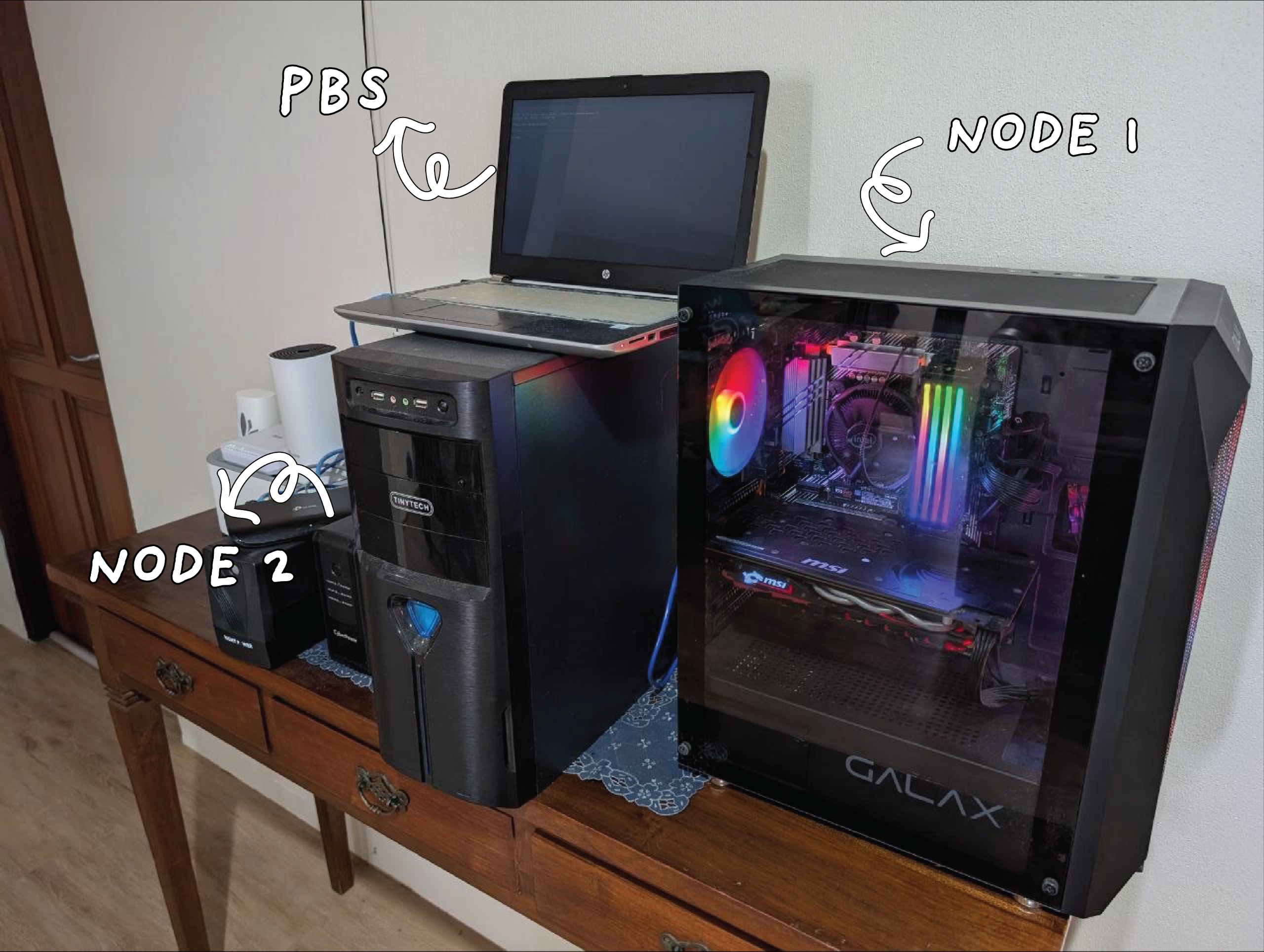
The messy desk shot below is the same Labuan stack the rest of the post talks about: Node 1 is the big tower on the right, PBS runs on the open laptop, Node 2 sits on the UPS to the left, with mesh Wi-Fi and Ethernet behind.
Labuan (main site)
- Two Proxmox nodes (home compute).
- Node 1
Pi-hole(primary DNS for the lab).Jellyfin,Nextcloud.- One
Portainerstack:Authentik,Nginx Proxy Manager, Open WebUI,n8n,Komga.
- Node 2
Home Assistant.- Another
Portainer:GitLab,Grafana. Openclaw.
Proxmox Backup Server(PBS) on the same site (cluster backups not tied to a single storage node only).
Kota Kinabalu
- External access location: devices on the same tailnet (not a second primary site).
Cloud VPS
Uptime Kuma(monitoring).- Secondary
Pi-hole(DNS backup, or when I’m away from the main site).
Between sites
- Labuan, KK, and the VPS all talk over Tailscale (one tailnet).
| Site | Main role | Things I’d grep for |
|---|---|---|
| Labuan | Compute + PBS | Proxmox Node 1/2, PBS, most services |
| Kota Kinabalu | Access when I’m there | tailnet devices, same Tailscale account |
| VPS | Monitoring + DNS backup | Uptime Kuma, secondary Pi-hole |
For admin access and cross-site traffic, I route through Tailscale. The main traffic pattern does not need to be exposed straight to the internet. That gives a more practical extra layer of security for a homelab.
Goals (why the shape exists at all)
- Basic redundancy for VM/CT workloads.
- Backups not living in the same place as the only copy.
- Safer, easier-to-manage access between sites.
- Still realistic to maintain solo.
Why I landed on this model
I’m not chasing "enterprise-grade" for its own sake. I want something that:
- doesn’t blow the budget,
- is easy to troubleshoot when something breaks,
- and is reliable enough for homelab + self-hosted services.
Two Proxmox nodes hit a decent balance for me. Enough to spread workloads and try new things. If one node has issues, the other can still carry part of the important stack.
In the diagram I split it clearly. Node 1 is more "home + internal-facing public": media, Nextcloud, NPM/Authentik. Node 2 is home automation plus dev/observability: Home Assistant, GitLab, Grafana.
My main site is in Labuan. The link from Kota Kinabalu is purely for convenience because it lets me access my Labuan services easily without the hassle of toggling Tailscale on every device, when I’m at Kota Kinabalu.
In practice everything is reachable over Tailscale. I can maintain and hit services more safely without opening a pile of public ports.
I put Uptime Kuma on the VPS because I want one monitoring endpoint that stays reachable even if the main site has a short blip.
Secondary Pi-hole on the VPS is another DNS layer when I’m off-site. It’s also there when I want a logical failover mindset from the primary on Node 1. Both instances sit in the same tailnet as the lab.
The VPS joins Tailscale the same way Labuan and KK do. Health checks from Uptime Kuma to VMs, containers, and important endpoints can run over the tailnet without needing lots of public ports open.
Video that helped with site-to-site
When I was wiring the Labuan ↔ Kota Kinabalu side of things (same tailnet, sane routing between “sites”), I leaned on this walkthrough: How to easily set up a site to site VPN using Raspberry Pi subnet routers and Tailscale (YouTube). Your hardware might not be a Pi, but the subnet router / site-to-site mental model is what carried over for me.
Network layout
This diagram summarises the real services across the cluster, PBS, and the VPS. Every site is on the same tailnet (Tailscale).
graph LR
    subgraph TS_NET [Tailscale Mesh]
        TS[Tailscale]
    end

    subgraph LAB [Labuan - Main Site]
        direction TB
        subgraph PVE [PVE Node 1]
            direction TB
            PIHOLE_P["PiHole<br/>Primary"]
            JELLY[Jellyfin]
            NEXTCLOUD[Nextcloud]
            subgraph P1 [Portainer 1]
                AUTHENTIK[Authentik]
                NPM["Nginx Proxy<br/>Manager"]
                OPENWEBUI[Openwebui]
                N8N[n8n]
                KOMGA[komga]
            end
        end

        subgraph PVE1 [PVE Node 2]
            direction TB
            HAOS[Homeassistant]
            OPENCLAW[Openclaw]
            subgraph P2 [Portainer 2]
                GITLAB[Gitlab]
                GRAFANA[Grafana]
            end
        end

        PBS[Proxmox Backup]
    end

    subgraph CLOUD [Cloud VPS]
        direction TB
        UK[UptimeKuma]
        PH["PiHole<br/>Secondary"]
    end

    B[KK Site]

    %% Connections (linkStyle thickens lines; beautiful-mermaid needs spaces around --- / -->)
    LAB --- TS
    CLOUD --- TS
    B --- TS
    linkStyle default stroke-width:2.5px
How data actually flows
Roughly, it follows the diagram above. In short:
- Compute: main VMs and containers run on the two Proxmox nodes. I split by role: media + files + reverse-proxy stack on Node 1; home automation + dev/metrics on Node 2.
- DNS: primary resolver is
Pi-holeon Node 1. Secondary on the VPS when the access context is different, or as a logical backup inside the tailnet. - Ingress and SSO: most of that goes through
Nginx Proxy Manager+Authentik. - Portainer stacks: on Node 1, automation (
n8n), Open WebUI, andKomgasit in the same Portainer world as NPM/Authentik. On Node 2,GitLabandGrafanalive in their own Portainer so I can manage Docker lifecycle per node without stacks stepping on each other. - Backup: PBS pulls Proxmox snapshots / backups so recovery isn’t pinned to one disk or one node.
- Tailscale: from KK or any device on the tailnet, I hit Proxmox, service UIs, and PBS like an internal network. The VPS (
Uptime Kuma+Pi-hole) is the same story: one logical mesh.
What I care about most here is consistency and accessibility. Something "running" isn’t the same as something being easy to reach when you need it. I try to keep routes, tunnels, DNS, and occasional checks aligned so day-to-day use stays stable.
What I’m still improving
This setup isn’t perfect. On my list:
- more detailed recovery documentation,
- automated backup health checks,
- and clearer tagging of what’s critical vs nice-to-have.
If you’re building a homelab too, my advice is simple:
start with a clear structure (compute, backup, network path), then add fancier layers on top.
Don’t wait for a "perfect" setup before you document. Write early, even if it’s rough.
Closing
For me, the biggest value of a homelab isn’t just "owning servers." It’s when you understand your own system’s flow, know what happens when a piece fails, and have a plan to recover.
Tools like Proxmox, PBS, Portainer, Pi-hole, Tailscale, and a VPS are just tools. What matters is an architecture that fits your time, budget, and energy.


1 Response
[…] This Pi is part of my wider homelab, not just a standalone board. I keep Tailscale on it so I can access it from Kota Kinabalu while the hardware sits at the Labuan site. That lets me handle normal admin checks and troubleshooting remotely without opening extra public ports. If you want the broader homelab layout and cross-site flow, I documented it here: Two Proxmox nodes, three places, one tailnet: how my homelab is wired. […]